
Eldforge Stats, Stat Points and Hesper’s Reset
Your Eldforge stats affect weapon damage, magic and recovery. Learn how to read their sources, spend available points and find the reset service.
Hover over a stat to see its sources and effects. The Stats tooltip lists one Stat Point every 10 levels starting at Level 20; spend your available balance with the + buttons. To open the reset service, visit Mother Hesper in Gloomfen and choose Unweave my path.
What Each Stat Does
| Stat | Effect |
|---|---|
| Strength (STR) | Sword, greatsword and axe damage |
| Agility (AGI) | Dagger and bow damage; critical chance |
| Intellect (INT) | Magic damage; mana recovery |
| Spirit | Healing and Stamina recovery |
| Stamina | Resource for skills with Stamina costs |
Spirit improves both healing received and healing provided. Choose Strength for its supported weapons, Agility for daggers or bows, and Intellect for spell damage and mana recovery. Spirit supports healing and Stamina recovery, while Stamina is consumed by skills that list a Stamina cost.
Read Class Growth, Gear and Spent Points
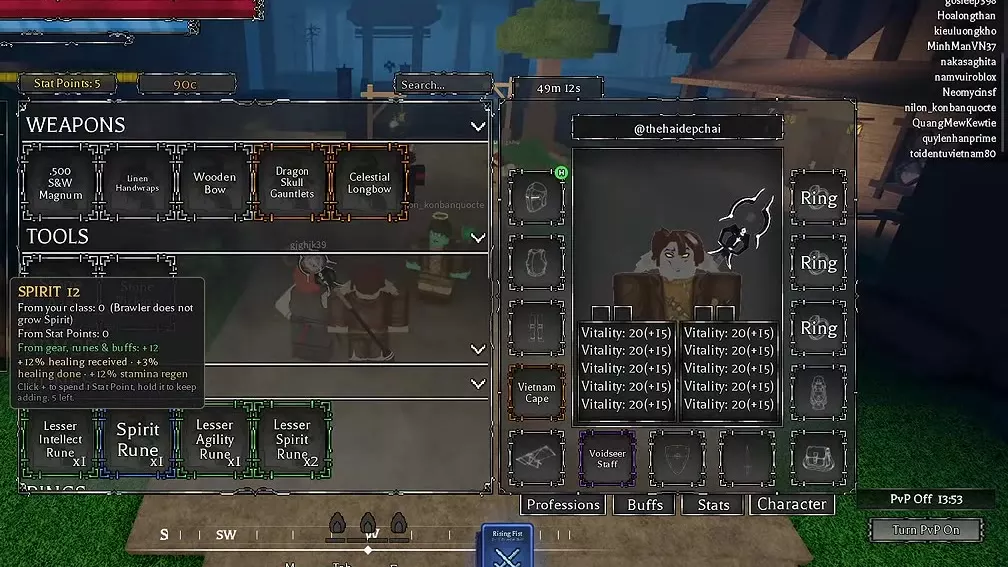
Open the character panel and hover over a stat. Its tooltip separates automatic class growth, manually spent Stat Points, and the combined contribution from gear, runes and buffs. Use the displayed effects to see what your current total provides.
For example, a Level 12 Warrior with 28 Strength has 24 from class growth, 1 from a spent point and 3 from gear, runes and buffs. That total gives 14% more sword, greatsword and axe damage.
A Brawler gains Strength, Agility and Stamina as it levels, but no Spirit from class levels. In a Brawler setup with 12 Spirit from gear, runes and buffs, the tooltip gives 12% more healing received, 3% more healing output and 12% more Stamina recovery. A Level 50 Brawler with 25 Agility from class growth has 12.5% more dagger and bow damage and 5% more critical chance.
Spend Available Points or Visit Hesper
Class growth happens automatically when you level up. Stat Points are spent separately: the Stats tooltip lists one point every 10 levels starting at Level 20. Check your available balance and spend any points already shown there.
- Open the character panel. When a level-up prompt offers access to Stat Points, press Tab.
- Click the + beside the stat you want. Each click spends one available point; hold the button to add points repeatedly.
- Check the updated stat and remaining balance.
To open the Stat Points reset service, go to Mother Hesper's hut in Gloomfen, hold E to speak to her and select Unweave my path.

Class Builds and Profession Bonuses
Match your stat investment to the weapons and skills you intend to use. For gear and milestone choices, see class builds for hunts and bosses; compare starting growth and playstyles in base classes.
Profession progress also contributes to your character: Level 20 Mining boosts Strength and Level 20 Lumberjack boosts Agility. Herbalism contributes Spirit, while Alchemy contributes Intellect. Find trainers and resources in the gathering professions guide and learn to brew in the Alchemy guide.